
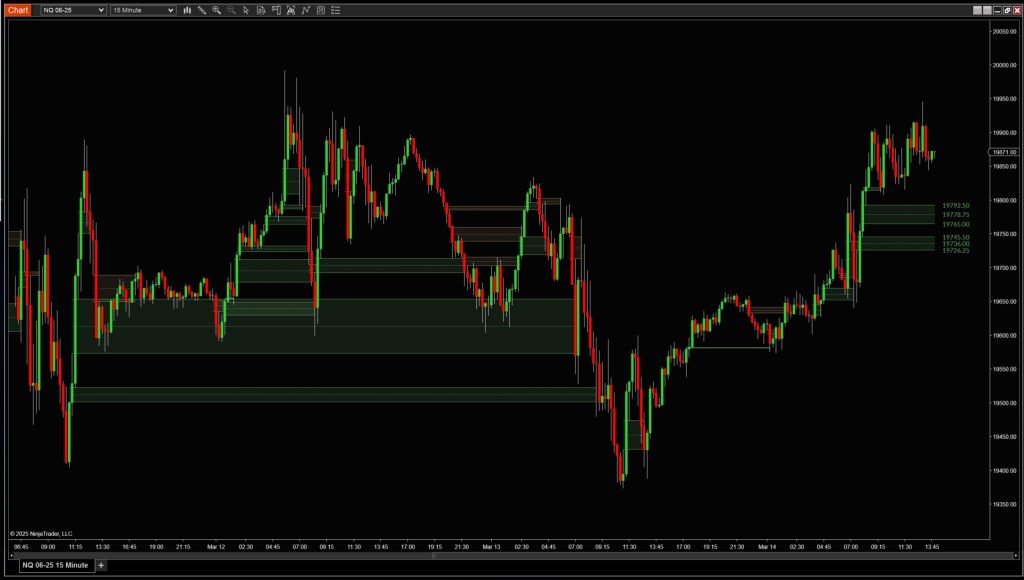


Description
Markets often move too fast for fair pricing to keep up. When they do, gaps in value form — areas where aggressive buyers or sellers overwhelmed the other side. These imbalances are commonly revisited, acting as magnets or reversal zones later in the session.
The Fair Value Gap indicator automatically detects and displays these zones in real-time, giving you the ability to track clean, untested zones or all recent imbalances. You control the sensitivity, zone size, and display style — whether you’re working off a 5-minute chart or volume-based data.
Tip: When price returns to a previously unfilled gap, take note of the reaction. Fast rejections signal active defense by trapped traders. Consolidation inside the zone may imply absorption and continuation.
Fair Value Zone Settings
Filters
Define what kind of bars and zones to track:
- Time Frame: UseChartBars, Seconds, Minutes, Ticks, Volume, or Range
- Period: Number of bars used to scan for gaps
- Min Zone Size: Minimum tick size for a gap to be considered valid
Zones
Control the appearance and structure of the zone display:
- Display Type:
- Naked: Only shows unfilled gaps
- Color Up / Color Down:
- Customize colors for bullish or bearish gaps
- Area Opacity:
- Adjust how transparent the filled area appears
- Line DashStyle:
- Solid, Dot, Dash, or Custom
- Line Width / Line Opacity:
- Adjust thickness and visibility of border lines
- Mid DashStyle / Mid Width / Mid Opacity:
- Configure the centerline running through the zone
- Show Price:
- Toggle to show price value of each gap
- Extended:
- Extend the zone indefinitely across the chart
Notifications
- Enable Alerts
- Get notified when price enters or touches a zone
Data Series
- Input Series:
- Choose which data series the indicator reads from (e.g., MNQ 06-25, 5 Minute)
Setup
- Calculate:
- On bar close or intrabar (tick by tick)
- Label:
- Custom text label for each zone (e.g., “Fair Value Gap”)
- Maximum Bars Look Back:
- Set how far back the tool scans for valid gaps
 Pyramid Indicators